Time4Bets Mobile Access: How the Official Telegram Bot Replaces a Native App
Hunting for the Time4bets app in the App Store? Save yourself the scrolling… it simply isn’t there. Google Play won’t help either. Time4Bets went its own way: mobile access runs through an official Telegram bot that behaves like a fully loaded client. Sounds odd at first, right? Yet it works, and it works well. This guide unpacks the whole thing: how the Telegram client operates, how iOS and Android users hop aboard, how installation and launch happen, how registration and login work on a phone, where the bonuses and games hide, which glitches pop up most often, and how to squash them. A short FAQ closes the show. The perks of this setup are obvious: no Time4bets APK hunting, no app store restrictions to sidestep, automatic updates handled server-side, and encryption baked into the Telegram protocol. Any gadget with Telegram installed, be it a phone, tablet, or desktop, becomes your betting terminal.
Open Telegram, find the official bot, and see the difference yourself.

How the Time4Bets Telegram Client Works
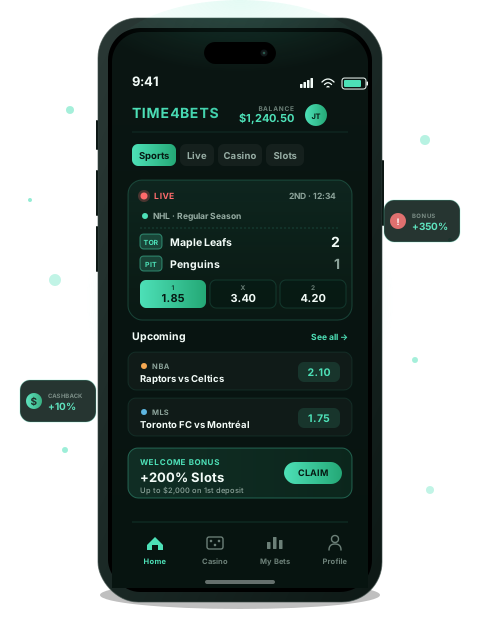
So what exactly is this bot? It is the official mobile client of the platform. It lives inside Telegram, sure, but it is not a Telegram product – Time4Bets built it, runs it, and updates it. Picture a full casino cockpit squeezed into a chat window. Registration, login, deposits, bet placement, the casino lobby, bonus activation, balance checks, withdrawals… the entire toolkit hides behind a handful of taps. Plenty of Canadians casually call it the Time4bet app, and honestly, the nickname fits. Control happens two ways: typed commands in the chat and inline buttons under each bot message. No Time4bets app download from any store is needed, updates roll out silently, and Telegram’s encrypted protocol shields the conversation itself. One crucial nuance deserves attention: your registration and payment details never sit inside Telegram. They travel through a protected Time4Bets channel with PCI DSS-compliant processing behind it.
| Command | What it does |
| /start | Launches the bot and opens the main menu |
| /balance | Shows your current account balance |
| /deposit | Opens payment options for topping up your account |
Type /start today and explore the menu at your own pace.
iOS Users and Time4Bets Mobile
iPhone in hand? Getting started takes minutes, not hours. Here is the routine:

-
✓
Grab Telegram for free from the App Store.
-
✓
Sign in with your phone number.
-
✓
Follow the bot link from the official Time4Bets website – verify authenticity carefully; phishing clones do exist.
-
✓
Tap Start to wake the bot up.
-
✓
Register or log into your existing account.
-
✓
That’s the whole quest. No Time4bet app download in the traditional sense, because nothing gets installed beyond Telegram itself. The interface feels surprisingly native on iOS: tidy buttons, Face ID for quick Telegram access, push notifications about bet statuses. Sportsbook, casino, live tables, bonuses, withdrawals – all of it works without extra software. Performance stays rock solid on iPhone and iPad alike. Craving the Time4bets app experience without App Store drama? You just found it.
Download Telegram on your iPhone and launch the bot in five minutes flat.
Android Users and Time4Bets Bot Setup
Notice what’s missing? Exactly – no Time4bets APK to sideload, no scary “unknown sources” toggle, no warnings from a nervous antivirus. Android brings extra treats too: several Telegram accounts running at once, tablet and Android TV support, flexible notification settings for bet updates, and smooth background operation. Once the bot is alive, many players treat it as their personal Time4bet app, and it unlocks the full platform: sportsbook, casino, welcome bonuses, plus event promos like World Cup Wheel Rewards.
Set up the bot on Android tonight and claim your welcome bonus.

Android crowd, your road is even smoother. The checklist:
-
✓
Install Telegram from Google Play, or grab it straight from telegram.org if your device lacks Google Services.
-
✓
Authorize with your phone number.
-
✓
Open the official bot link from the Time4Bets site.
-
✓
Hit Start.
-
✓
Register or sign in to your account.
Signing Up Through the Mobile Bot
Registration through the bot is quick and, frankly, kind of pleasant. The path looks like this:
-
Start the Bot
Launch the Telegram bot and tap the Start command to begin registration.
-
Choose Sign Up
Select Register or Sign Up from the menu to create your account.
-
Enter Your Email
Use a unique email address that isn’t linked to another Time4Bets account.
-
Create a Password
Set a strong password with at least 8 characters, including uppercase and lowercase letters and numbers.
-
Verify Your Age
Enter your date of birth. The 18+ age check is mandatory for all players.
-
Select Your Details
Choose your country and preferred currency. For local Canadian players, select Canada and CAD.
-
Accept the Policies
Review and accept the Terms of Use and Privacy Policy with a single click.
-
Confirm Your Email
Open the confirmation link sent to your inbox to complete the registration process.
Average time? Three to five minutes when the data is correct. Every field you fill is stored in a secure Time4Bets channel, not inside Telegram. After the email confirmation, your account is battle-ready: fund it and grab a welcome bonus. Forget the endless Time4bets app download searches – registration lives right in the chat. Same story with Time4bet app download queries: the bot is already the answer.
Register through the bot and activate your first deposit bonus today.
Accessing Your Account on Mobile
Logging in mirrors the web version almost exactly. Launch the bot, choose Login or Sign In, type your email and password, and add the 2FA code if you switched two-factor protection on. Whether you treat the bot as a Time4bets app substitute or just a handy shortcut, the credentials stay identical to the desktop site. Lost your password? Pick Forgot Password in the bot or ping live chat, enter the email tied to your account, catch the reset link in your inbox, and set a fresh one. A few classic hiccups deserve a mention here. Forgot which email you used? Contact support with other verification details. Locked out after several wrong attempts? That’s usually a temporary block of 15 to 30 minutes, so breathe. Switched phones? The Time4bet app logic follows your Telegram account, though extra verification may pop up for safety reasons.
Log in through the bot and check your balance in seconds.


Sports Betting and Casino Games via Bot
Everything that matters is reachable through the bot. Pre-match and live betting cover soccer, hockey (hello, Canada), basketball, tennis, MMA, and esports. The casino wing serves slots from Pragmatic Play and dozens of other studios, while the live casino by CreedRoomz brings real dealers straight to your screen. The mobile sportsbook is genuinely convenient: rapid access to the lines through bot commands, live bets placed mid-match in a couple of taps, and cashout available right from the mobile interface. Slots open through links in the bot and load in your device’s browser, neatly adapted to small screens; live tables stream in HD whenever the connection holds. The whole setup respects your data plan – the interface is featherlight, and heavy games load only when you actually launch them. No Time4bets APK means zero storage bloat, too. Search engines drown in Time4bets app download and Time4bet app download requests, yet the truth is simpler: one bot covers everything. And remember the golden rule of responsible gaming – set limits, wager only your entertainment budget, and never chase losses, because no outcome is ever guaranteed.
Open the sportsbook through the bot and place your first live bet.
Common Mobile Issues and Fixes
Even the smoothest tech stumbles sometimes. Bot gone silent? Restart Telegram, check your internet connection, and send /start again – that combo revives it nine times out of ten. Slot or live-game links refusing to open? Make sure Telegram’s built-in browser is allowed in your device settings, then update Telegram to the latest version. SMS code missing during registration? Wait two or three minutes, request a resend, and double-check the phone number for typos. Live casino loading like molasses? Test your internet speed and jump from mobile data to Wi-Fi. Cashout acting stubborn? Refresh the bet page, verify the current cashout odds, and try again after a few seconds – odds shift fast. If your improvised Time4bet app, meaning the bot, still misbehaves, the 24/7 live chat works right inside the mobile version. And here’s a quiet upside: no Time4bets app in the classic sense means no app crashes, only Telegram occasionally needing a gentle nudge.
Contact the 24/7 live chat straight from the bot whenever something breaks.
No. Access runs through the official Telegram bot, so every Time4bets app download search leads back to Telegram.
Yes. Telegram encrypts messages, and payment data is processed on the Time4Bets side through a PCI DSS-compliant channel.
Yes. One account works through Telegram on all your devices simultaneously.
No. The platform officially serves the Canadian audience.
Yes. The Canadian dollar is a supported account currency, so transactions skip conversion entirely.
Fully. No Time4bets APK and no separate Time4bet app download required.
Play smart, stay within your limits, and enjoy the game.